


Real Integration Failure Stories from the Shop Floor – Ghost Products
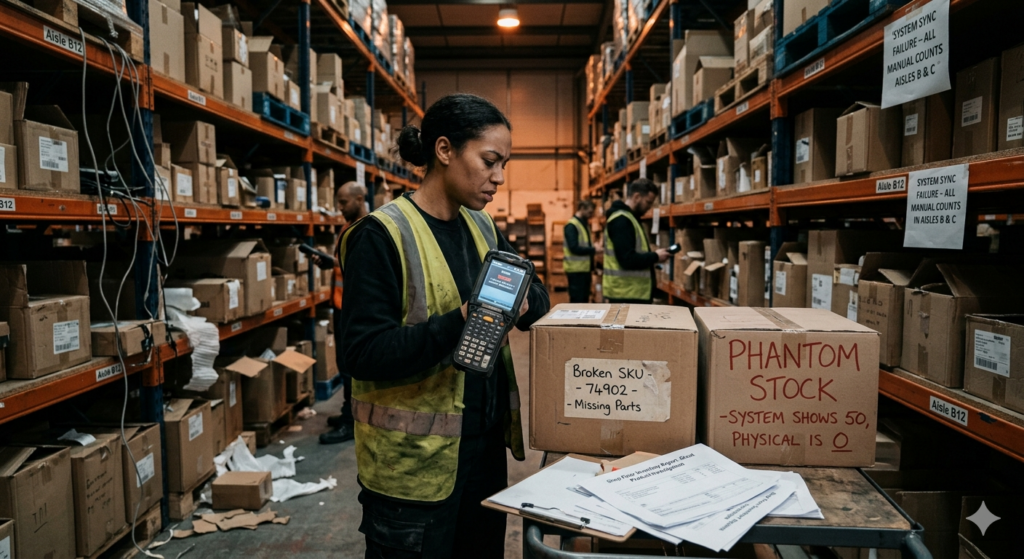
Nobody sets out to build a broken retail operation. The ghost products haunting your Shopify storefront, the phantom stock your system swears exists but your warehouse can’t find, the broken SKUs that throw the whole integration into chaos – none of it was intentional. It happened gradually, one workaround at a time, until the day a customer caught the lie before you did.
Across hundreds of Lightspeed Shopify integration deployments, the same failure patterns surface again and again. They have different names in different stores, but the root cause is almost always the same: two systems, improperly connected, slowly drifting apart at the data level while nobody’s watching.
Here are four real failure stories from the shop floor – the kind that never make it into vendor marketing but every retail ops team knows by heart.
The data problems that break a Lightspeed Shopify integration rarely announce themselves. They accumulate quietly – one mismatched SKU, one manual override, one batch sync failure at a time.
Story 1: The Ghost Products That Kept Selling
A specialty outdoor gear retailer in Colorado discontinued a popular tent model when the manufacturer stopped producing it. They archived the product in Lightspeed, removed it from their active catalog, and assumed Shopify would follow.
It didn’t.
Because the integration was configured to sync from Lightspeed to Shopify only on product updates – not on archive events – the tent listing lived on in the online store. Still searchable. Still purchasable. Still showing 3 units in stock.
Over the next six weeks, the store processed eleven orders for a product that no longer existed in their inventory. Eleven cancellations. Eleven refunds. Eleven customer service conversations that each began with some version of: ‘But your website said it was available.’
🔍 What went wrong: The integration didn’t treat product archiving in Lightspeed as a trigger event. Shopify never received the signal that the product was gone. The sync gap between ‘archived in POS’ and ‘removed from storefront’ was measured in weeks, not seconds.
THE FIX: Archive and discontinue events in Lightspeed must be mapped as explicit triggers in your Lightspeed Shopify integration – not assumed. Test every lifecycle state, not just active product edits.
Story 2: Phantom Stock and the SKU That Duplicated Itself
A mid-size apparel retailer in Toronto was running Lightspeed R-Series in three store locations and Shopify as their online channel. Their ops team decided to clean up their product catalog – renaming SKUs to a new internal convention to make reporting easier.
What they didn’t know: the Lightspeed Shopify integration uses the SKU field as the primary matching key between the two systems. When they changed the SKUs in Lightspeed, the integration couldn’t find the corresponding Shopify products anymore. So it did what it was configured to do when no match was found – it created new products.
Within 48 hours, their Shopify catalog had doubled. Every renamed product now existed twice: the original listing (now orphaned, with stale inventory) and a newly created duplicate (with correct inventory but no sales history, no reviews, no SEO equity). Customers were landing on the wrong listing. The old listings were still taking orders. Inventory counts were now split between two product records per SKU.
🔍 What went wrong: SKUs are the spine of a Lightspeed Shopify integration. Changing them mid-flight without a migration plan severs the link between systems. The integration doesn’t ‘update’ a renamed product – it treats it as a new one and creates a duplicate.
THE FIX: Never rename or restructure SKUs in Lightspeed without first understanding how your integration handles matching. Plan any SKU migration as a coordinated operation across both platforms, with the integration paused during the transition.
Story 3: The Inventory That Returned from the Dead
A home décor retailer in Vancouver processed a large customer return on a Saturday afternoon – fifteen units of a decorative item that had been damaged in shipping. In Lightspeed, the return was correctly logged and the fifteen units were added back to store inventory.
But the integration was running on a 6-hour batch sync schedule.
In the six hours between the return and the next sync, a social media post featuring one of their products went mildly viral. Traffic to their Shopify store spiked. Eighteen customers ordered the decorative item online – the one that, according to Shopify’s last synced count, had zero units available.
Except Shopify hadn’t synced the return yet. It still showed zero stock. So why did the orders go through?
Because the store had disabled out-of-stock blocking to avoid losing sales on items that were ‘probably available.’ The Shopify store was configured to allow purchases even when inventory showed zero. The returned stock existed in Lightspeed. The online orders existed in Shopify. And no bridge had told one system about the other’s reality.
Three of the eighteen orders couldn’t be fulfilled because the physical condition of the returned units meant only twelve were sellable. Three more cancellations, three more refund conversations.
🔍 What went wrong: Two compounding failures: a batch sync schedule that created a six-hour data gap, and an oversell protection setting that was disabled to compensate for a different inventory gap problem. Each workaround enabled the next failure.
THE FIX: Inventory buffers and oversell protection settings in Shopify are not substitutes for real-time POS eCommerce sync. Fix the sync latency first – then you can safely configure oversell rules that reflect reality.
Story 4: The Broken Variant That Brought Down the Whole Product
A footwear retailer in Chicago was using Lightspeed X-Series integrated with Shopify to manage a catalog of several hundred shoe styles, each with multiple size and width variants. A new team member updating product information made what seemed like a minor change: they edited the description of a single size variant directly in Shopify.
One edit. In Shopify. On one variant.
Per Lightspeed’s own integration documentation, editing product information in Shopify – including variant details – can break the sync entirely. The system of record for a Lightspeed Shopify integration must be Lightspeed. Always. Without exception.
The variant edit created a conflict the integration couldn’t resolve. Rather than failing silently on that one variant, the desync propagated upward – the entire parent product stopped syncing. Inventory updates for all seventeen size variants of that shoe style went dark. Over the next four days, the store oversold four variants and understocked three others before the break was detected during a routine inventory audit.
🔍 What went wrong: A single Shopify-side edit on a linked product variant broke the sync for the entire product record – all variants included. The integration had no conflict resolution mechanism to isolate the failure, and no alert was triggered.
THE FIX: Train every team member who touches product data on the cardinal rule of Lightspeed Shopify integration: Lightspeed is the system of record. Never edit linked product names, prices, SKUs, variants, handles, or inventory directly in Shopify.
The Common Thread: What These Stories Actually Teach Us
Each of these failures looks different on the surface – a ghost listing, a SKU duplication, a stale batch sync, a broken variant. But they share the same underlying anatomy:
- A gap between what one system knew and what the other believed to be true.
- A missing trigger, a wrong setting, or a manual override that widened that gap.
- A lag before anyone noticed – measured in hours, days, or weeks.
- A customer who experienced the gap before the retailer did.
Lightspeed Shopify integration, when implemented correctly, eliminates most of these gaps by design. But ‘implemented correctly’ is doing significant work in that sentence. The integration is only as reliable as the architecture behind it: real-time triggers, SKU discipline, a single system of record, and explicit rules for every product lifecycle event.
The retailers who avoid these failures are not the ones who got lucky. They’re the ones who asked the right questions before they went live – and kept asking them as the business grew.
Quick Integration Health Checklist
Before your next product launch, price change, or catalog update, verify:
- Lightspeed is set as the system of record – no product edits happen in Shopify for linked items.
- All product lifecycle events (archive, discontinue, draft) are mapped as sync triggers.
- SKU fields match exactly between Lightspeed and Shopify – no renames pending without a migration plan.
- Sync frequency meets your transaction volume – if you’re processing 50+ daily transactions, batch sync isn’t enough.
- Variant-level inventory is syncing, not just parent product totals.
- Returns and adjustments in Lightspeed are triggering immediate Shopify inventory updates.
- Oversell protection settings in Shopify reflect your actual real-time sync capability.
- Someone on your team receives an alert when the integration connection fails or a sync conflict is logged.
A Lightspeed Shopify integration that runs silently is not necessarily running correctly. The most dangerous failures are the ones nobody noticed – until a customer did.

